MyTeamsFinalLogo
MyTeamsFinalLogo
what is sql | MyTeams

What is SQL - Sequential Query Language Explained

By - MyTeams Editorial

20-May-2025

Table of Contents

What Is SQL?

SQL stands for Structured Query Language, a standardized programming language used for managing and manipulating databases. 

In simple terms, SQL is the language that lets you query a database to retrieve information or update data. It is a declarative language, meaning you describe what data you want (for example, “find all records where age > 18”) without specifying how to get it, the database engine figures that out. 

SQL is most commonly used with relational databases, which organize data into tables of rows and columns. In fact, SQL became an ANSI and ISO standard for relational database queries in the late 1980s, and today nearly all relational database systems (like MySQL, PostgreSQL, Oracle, and SQL Server) support SQL in some form.

If you’re new to databases and wondering exactly what is SQL, think of it as the fundamental language that you use to talk to and work with SQL databases. With SQL, you can ask questions like “What were the top 10 highest sales last month?” or command the database to add new data or update existing data all through simple, English-like statements.

what is sql used for | MyTeams

What is SQL used for?

SQL is used for any task that involves storing, retrieving, or managing structured data in a database. Here are some of the most common uses of SQL:

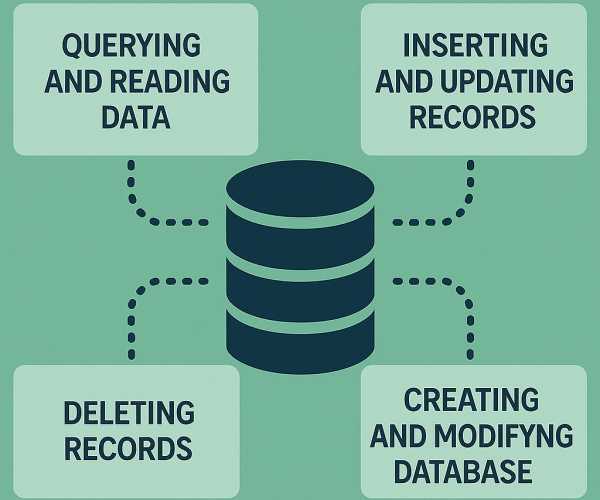
  • Querying and Reading Data: SQL can execute queries to retrieve data from a database. For example, you might use a SELECT statement to get all customers who live in a certain city. In other words, SQL is used to ask questions of your data and get meaningful answers (reports, listings, summaries) back.


  • Inserting and Updating Records: With SQL you can insert new records into a database (e.g., adding a new user or a new sales transaction) and update existing records (e.g., changing a product’s price or a user’s email). This makes SQL essential for keeping database information current and accurate.


  • Deleting Records: SQL is also used to delete data that is no longer needed, for instance, removing a record of a cancelled order. This helps in maintaining the database by removing outdated or unwanted entries.


  • Creating and Modifying Database Structures: SQL isn’t just for data, it’s used for defining and altering the database structure itself. You can create new databases and new tables, define relationships between tables, and even set up views (saved queries) or stored procedures using SQL commands. In essence, SQL provides Data Definition Language (DDL) commands to design your database’s schema (its blueprint).


  • Managing Access and Security: In multi-user environments, SQL is used to manage permissions on tables and other database objects. Database administrators use SQL to grant or revoke user access rights, ensuring that people only see or change the data they’re allowed to.


  • Data Analysis and Reporting: Data analysts and developers use SQL to analyze data by writing complex queries, often involving aggregation (sums, averages, counts) and joining multiple tables. SQL is widely used in business intelligence tools and reporting systems to answer business questions (e.g., “What is the average order value for each month?”).


The simple answer to what is SQL used for spans everything from basic data entry tasks to complex data analysis. Whether you’re building a small application or working in a large enterprise, SQL is used for communicating with databases – asking questions about the data and instructing the database to perform various operations.
what is sql used for | MyTeams

What are the benefits of SQL?

SQL has been a cornerstone of data management for decades because of its numerous benefits and strengths. Here are some key benefits of using SQL:

  • Easy to Learn and Use: SQL has a syntax that is close to plain English, which makes it relatively easy to learn. For example, a query like SELECT name FROM Customers WHERE city = ‘London’; is easy to understand. Because SQL is a high-level, declarative language, you specify what you want (e.g., select data where city is London) rather than how to get it. This ease of use means even beginners can start writing simple queries quickly.

  • Productivity and Efficiency: Using SQL, a few lines of code can replace hundreds of lines in a procedural language to get the same data. Its powerful set of built-in functions (such as filtering, joining tables, aggregating data, etc.) allows developers and analysts to extract insights from data quickly. This efficiency in data manipulation and retrieval can significantly speed up development and analysis tasks.

  • Standardized and Widely Supported: SQL is an ANSI/ISO standard, which means the core commands and capabilities are consistent across different database systems. This standardization provides portability, you can learn SQL once and apply it to various database systems with minimal changes. Many major relational databases (MySQL, Microsoft SQL Server, Oracle, PostgreSQL, etc.) support SQL, so skills are transferable. There is also a large ecosystem of tools (reporting tools, BI platforms) and libraries that support SQL databases, making integration easier.

  • Robust Data Management & Integrity: SQL databases are known for enforcing data integrity through concepts like constraints and transactions. They adhere to the ACID properties Atomicity, Consistency, Isolation, Durability. These ACID properties ensure reliable transactions and consistent data. For example, SQL transactions guarantee that either all steps of an operation succeed or none do (atomicity), and that the database won’t be left in a half-updated state. This makes SQL excellent for applications where data accuracy and consistency are critical (banking, finance, e-commerce, etc.).

  • High Performance with Large Datasets: Modern SQL databases can handle large volumes of data and complex queries efficiently. They provide features like indexing and query optimization that allow fast data retrieval even as the database grows. (We’ll discuss what is indexing in SQL shortly, essentially, it’s a way to speed up searches.) Many SQL databases also support performance enhancements such as partitioning data, caching query results, and using advanced storage engines to improve speed.

  • Scalability and Reliability: Leading SQL database systems offer scalability – you can handle increasing workloads by upgrading hardware or using clustering (multiple database servers working together). They also offer high availability features (like replication and failover clustering) to ensure the database is reliable and up almost 24/7. This means SQL databases can grow with your application’s needs and provide enterprise-grade reliability.

  • Strong Security Controls: SQL databases typically include robust security features. You can control access to data through user authentication and fine-grained permissions (who can SELECT or UPDATE certain tables, etc.). Many SQL databases also provide encryption features and auditing. When used correctly, SQL can be very secure. (However, it’s important to follow best practices to avoid issues like SQL injection, more on that later.)

  • Community and Support: Since SQL has been around for a long time and is widely used, there is a vast community of developers and database administrators knowledgeable in SQL. There are countless tutorials, forums, and tools available. Many SQL database systems are open-source or have free versions, meaning you can benefit from community-driven improvements and support. The maturity of SQL technology means most problems you encounter have well-documented solutions.

Overall, the benefits of SQL make it a reliable and powerful choice for data storage and manipulation. It provides a combination of ease-of-use, power, and reliability that has stood the test of time in the software industry.

AnalyticsTeamImage

Need Help With SQL Database Development?

What are supporting technologies of SQL?

While SQL is a language, it doesn’t work in isolation – it operates within a larger ecosystem of database technology and concepts. To effectively use SQL, it helps to understand some supporting technologies and related concepts:

  • Relational Database Management Systems (RDBMS): An RDBMS is the software that implements the SQL language and manages the databases. SQL itself is just the query language; the actual data is stored and organized by an RDBMS such as MySQL, PostgreSQL, Oracle Database, or Microsoft SQL Server. These systems use SQL as the interface for users to create tables, insert data, and query information.

    In other words, an RDBMS is the engine under the hood, and SQL is the steering wheel. Modern RDBMS software ensures data is stored efficiently and enforces the rules (schema, constraints) defined by SQL commands. Without an RDBMS, SQL would have no environment to run – they are two sides of the same coin.


  • Database Schema: You may be wondering what is an SQL schema. An SQL schema is essentially the blueprint of the database – it defines how data is organized into tables, what columns each table has (and their data types), and how tables relate to each other (keys and relationships). In practical terms, the schema is the collection of all table definitions, relationships, and constraints in a database.For example, a schema might specify that you have a Customers table with columns for ID, Name, and Email, and an Orders table that relates to Customers via a Customer ID.

    According to AWS,
    “A schema defines the structure of the database, including the tables, their relationships, and constraints. It acts as a blueprint for how data is stored and organized.” Designing a good schema (also called database design or data modeling) is crucial for ensuring data integrity and efficient queries. In sum, understanding what is an SQL schema is key to structuring a well-organized database.


  • Indexing in SQL: Another important concept to grasp is what is indexing in SQL. Indexing is a technology used by the database to improve query performance. An index in a database is similar to an index in a book, it helps you find information faster without flipping through every page.

    In SQL databases, indexes are special data structures (often B-trees or similar) that the database engine uses to locate data quickly. For example, if you often search for customers by their email address, you might create an index on the Email column of the Customers table. This way, the database can find the matching email much faster than scanning every row.

    As AWS documentation explains,
    “indexes are special lookup tables the storage engine uses to speed up data retrieval. An index is created on a column or a set of columns and helps locate data quickly without searching every row in a table.” Proper indexing can drastically improve the performance of SELECT queries, especially on large tables.

    However, overusing indexes or using them incorrectly can slow down write operations (INSERT/UPDATE), so they should be used judiciously. In summary, knowing what is indexing in SQL and how it works will help you optimize database performance.


  • SQL Extensions and Variants: The SQL standard has several dialects or variations. Each major RDBMS has slight proprietary extensions to SQL. For example, Microsoft’s SQL Server uses T-SQL (Transact-SQL) which adds programming features to standard SQL, and Oracle Database has PL/SQL (Procedural Language/SQL). These extensions include procedural elements (like loops, conditions) to complement SQL’s declarative syntax.

    While the core SQL commands (SELECT, INSERT, UPDATE, DELETE, etc.) work similarly across systems, these extensions provide additional capabilities. It’s useful to know that while SQL code is largely portable, you may need to adjust it slightly for different database systems due to these variations. The good news is that if you learn standard SQL, adapting to a specific database’s SQL dialect is usually straightforward.


  • Security Considerations (SQL Injection): When working with SQL in applications, it’s critical to be aware of security practices.
    A common term you’ll encounter is SQL injection. So,
    what is SQL injection? SQL injection is a type of malicious attack where an attacker “injects” (inserts) unauthorized SQL commands into an application’s input (such as a web form) to trick the database into executing them. For example, without proper safeguards, a login form that directly uses user input in an SQL query could be manipulated to return all users’ data or drop tables.

    SQL injection remains a serious threat, as attackers can use it to steal or corrupt data. The good news is that preventing SQL injection is well-understood: developers use parameterized queries or prepared statements (which separate code from data inputs) and validate user input to ensure any malicious SQL code doesn’t execute.

    In practice, it’s not enough to know what is SQL
    used for; one must also understand what is SQL injection and how to avoid it. By writing secure SQL code and using the security features of your database (like least-privilege user accounts and input validation), you can protect your database-driven applications from SQL injection attacks.


These supporting technologies and concepts form the ecosystem around SQL. In summary, SQL works in tandem with an RDBMS, relies on a well-designed schema to organize data, uses indexes for performance, can be extended with dialect-specific features, and must be used with good security practices to protect against threats like SQL injection. 

StrategyTeamImage

Plannning to Outsource Database Development?

What is Microsoft SQL Server?

When people ask what a SQL Server is, they are usually referring to Microsoft SQL Server. Microsoft SQL Server is a popular relational database management system (RDBMS) developed by Microsoft, and it uses SQL to manage data. 

In other words, SQL Server is database software. Its primary function is to store data and allow fast retrieval or manipulation of that data as requested by other applications. Microsoft SQL Server (often just called SQL Server) is a proprietary database system, which means it’s a commercial product (as opposed to open-source systems like MySQL or PostgreSQL). 

It was first released in the late 1980s and has since grown into an enterprise-grade platform. Microsoft offers SQL Server in various editions targeting different needs, from lightweight editions for small applications, to standard and enterprise editions for large-scale, high-performance, multi-user applications. For example, big companies might use SQL Server as the backend for their websites, internal applications, or data warehousing solutions.

Below are some essential properties of Microsoft SQL Server:

  • Integration with Windows and .NET: SQL Server is deeply integrated with the Windows operating system and Microsoft’s .NET framework. It’s often the go-to choice in a Microsoft-stack environment. It also now supports Linux for cross-platform deployments (as of SQL Server 2017 and later).

  • T-SQL (Transact-SQL): SQL Server’s variant of SQL, called T-SQL, includes additional features like stored procedures, functions, and transaction control that enhance the standard SQL. This allows developers to write complex business logic directly in the database if needed.

  • Tools and Services: Microsoft provides a suite of tools with SQL Server, such as SQL Server Management Studio (SSMS) for database administration and query writing, and additional services like SQL Server Reporting Services (SSRS) for reporting, SQL Server Integration Services (SSIS) for data integration (ETL), and SQL Server Analysis Services (SSAS) for analytics. These tools make SQL Server a comprehensive data platform, not just a database.
Agentic AI feature image - MyTeams

Fast. Accurate. Automated.
SQL Database Solutions.

What is a SQL database?

You might hear the term “SQL database” and wonder what it means. Simply put, an SQL database refers to a relational database that uses SQL as its query language. 

A SQL database organizes data into one or more tables, which consist of rows (records) and columns (fields), much like a spreadsheet. Each table represents a specific entity or topic (for example, a Customers table or an Orders table), and each column in a table represents an attribute of that entity (like Name, Email, OrderDate, Amount, etc.).

Important characteristics of an SQL database:

  • Structured, Table-Based Data: SQL databases store data in a structured format using tables. Each table has a predefined schema (structure): it specifies the number of columns, their names, and data types.
    For example, a Users table might have columns for UserID (an integer), Username (text), Email (text), and SignupDate (date). Because of this structure, SQL databases are excellent at handling structured data (data that fits nicely into rows and columns). This structure also enables powerful querying capabilities, since the relationships between tables are well-defined.


  • Relationships Between Data: SQL databases are relational. This means they can represent relationships between different tables of data. This is usually done using keys. For instance, an Orders table might have a column CustomerID that corresponds to a Customer table’s primary key, thereby linking each order to the customer who placed it.
    These relationships enable
    JOIN operations in SQL, where you can write a query that combines data from multiple tables (e.g., get a list of orders along with the customer’s name by joining Orders and Customers on the matching customer ID). The relational aspect is a big part of what makes an “SQL database” powerful.


  • Schema and Constraints: Every SQL database has an underlying schema that defines its structure. The schema is essentially the collection of all tables and the relationships between them, as well as rules (constraints) that the data must follow.
    For example, a schema can enforce that every Orders record must reference a valid Customer (a foreign key constraint), or that an email address in the Users table must be unique (a unique constraint).
    These rules maintain data integrity. In practice, when setting up an SQL database, a database designer will carefully plan the schema to accurately model the real-world data and rules. This answers what is an SQL database in terms of design: it’s a structured set of tables with a defined schema governing how data is stored.


  • Use of SQL Language: As the name suggests, an SQL database is interacted with using SQL commands. To retrieve data, you use SELECT queries; to add data, INSERT statements; to update data, UPDATE statements; and so on. The database system parses and executes these SQL commands to perform the requested operations. Because SQL is standardized, you can use similar queries across different SQL databases with minor adjustments.


  • Performance Features : SQL databases typically implement performance features like indexes, which we described earlier, to speed up data retrieval. They also often support transactions and advanced features like stored procedures and triggers (automated actions that occur in response to certain changes). These features allow SQL databases to handle large workloads efficiently and safely.
    According to AWS, SQL databases “offer various indexing and optimization techniques to ensure fast query performance even as the data size increases”.
    In essence, an SQL database combines the efficiency of structured storage with the power of the SQL language to query and maintain that data.
ReatailBannerImage

Have a Disruptive App Idea?

Conclusion

To conclude, what is a SQL database guide, it’s a structured, relational data store basically any database system like MySQL, PostgreSQL, Oracle, or SQL Server, that uses SQL to define the data’s schema and to query or modify that data. 

Leave a Reply

Your email address will not be published. Required fields are marked *

AI App Builders vs. Custom App Development

AI App Builders vs. Custom App Development: The Hidden Costs (2026)

By - Areeba Roshan
AI tools for business growth

I Tested Multiple AI Tools for Business Growth. Here’s What Actually Helped

By - Phil McKenzie

Thank You For Subscribing .