11 March 2025
Irrespective of which industry you operate in, one thing is certain, a user-centric mobile application is the way forward to grow your target audience, brand reach, and revenue in 2025.
In 2024, a survey discovered that mobile apps generated close to $1 trillion in revenue while another identified that smartphone users spent close to 90% of their time on apps downloaded from Google Play & Apple App Store.
So how do you get on the mobile application development bandwagon in 2025?
Our ultimate mobile app development guide is here to help you get there.
Like all other guides we begin with the essential question, what is mobile app development? But, we’re not going to bore you with an academic definition, rather analyze what the pros have already discussed.
Microsoft enlightens us that the definition of mobile application development can be comprehensive. The process encapsulates every aspect of the process from its ideation or concept planning to its deployment & post-launch maintenance.
IBM defines it as “the process of making software for smartphones, tablets and digital assistants, most commonly for the Android and iOS operating systems.” Mobile application development involves multiple stages as we discussed earlier. These include concept development, UI & UX design, programming or coding, QA testing, deployment, and maintenance.
So you’ve chosen to build a high performance and visually appealing mobile application, what now?
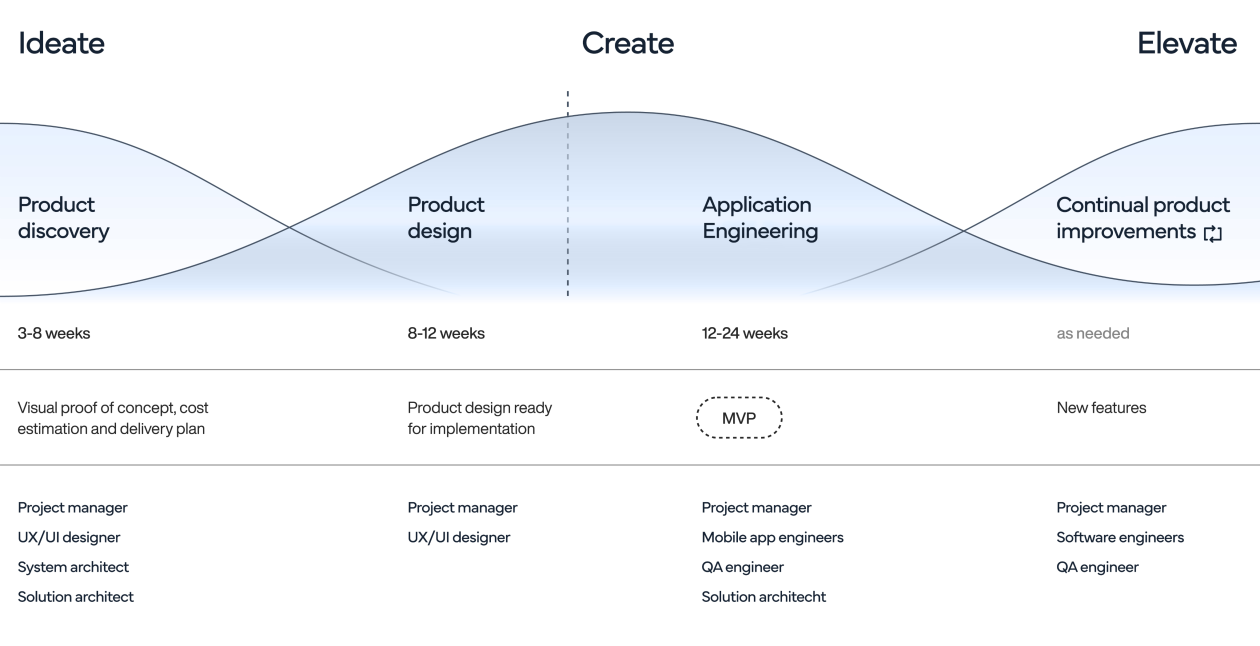
It’s time to begin the mobile application development process to plan, organize, design, develop, and release your custom app. This process as explained by professionals is a series of steps that determines the resources, tech stack, and timelines required to develop a premium quality application.
The mobile app development process includes:
Considered the foundation for mobile app development, the ideation phase is where a conceptual framework is developed to address your specific user, market, and business needs. For instance, during the ideation & concept development phase MyTeams establishes your unique value proposition and aligns it with your business objectives. A business consultant and a project manager begin by conducting comprehensive market research, which is essential to differentiate your app from the competition.
Progressing from the ideation phase, we arrive at the planning phase. This is where the project team defines your app’s functional requirements and creates a strategic roadmap. Mobile app development companies choose your preferred tech stack, allocate resources, and establish the timeline for the development project.
A dedicated project manager and consultant work together to prioritize features to create a MVP or minimum viable product. The MVP is a limited feature & design version of your app that aims to validate the concept before it moves into full-scale deployment.
The UI (user interface) and UX (user experience) design stage is considered critical to your app’s success. During this phase designers focus on crafting a user-centric, engaging, and intuitive interface that will engage your customers. The mobile application design stage begins with creating an elaborate wireframe, a basic sketch of your app screens (a skeleton per se), that serves as the starting point to develop future prototypes.
Designers routinely collaborate with you to iterate on layouts & navigation flows to optimize usability of the MVP, and eventually final version of the app. A Baymard Institute research discovered that approximately 90% of users will stop using an app that has poor UI & UX design.
The mobile application development phase is where the real magic happens. Your development team goes to work with actual coding, integrating the chosen functionality with the selected tech stack. Popular technologies & frameworks used for mobile app development include React Native, Flutter, Swift, and Ionic among many others.
Development is typically divided into front-end development and back-end development. While front-end devs work on the client side interface, back-end developers are focused on the server side logic and database integration within the application. The process is usually expedited and optimized by implementing agile project management methodologies. For instance, MyTeams project managers implement agile processes to improve development flexibility and adaptability to changes.
Quality assurance testing is an ongoing process that identifies defects, inconsistencies, and errors in your app. Using a mix of automated & manual methods quality assurance engineers conduct functional, performance, and security testing to optimize your app.
Functional testing ensures each feature operates as intended, performance testing rigorously assesses responsiveness under different conditions, and security testing ensures safeguards against different vulnerabilities. A report from Statista discovered that almost 21% of users abandon apps after one use when it hasn’t been properly tested for performance, security, and functionality.
The launch phase is when your app is deployed to the relevant app stores. Depending on the native OS, i.e. Android, iOS, or hybrid, the app is made available to the respective audience. During the launch phase the project team carefully adheres to platform specific guidelines with an app store optimization (ASO) strategy to maximize app visibility. A well-orchestrated marketing strategy can have a significant impact on your app’s adoption and long term success.
Maintenance or post-launch support is crucial to address user feedback and implement updates. In addition, this phase also maps out the strategy to expand the app into new platforms like the web version of an Android app. Delivering regular updates is essential to fix bugs & errors, introduce new features, and maintain the relevance & engagement of the app. Studies have discovered that apps that are regularly updated have 3 to 4 times higher retention rates.
A functional, intuitive, and engaging UI & UX design is crucial when developing your mobile application. An appealing user interface improves user satisfaction scores, customer loyalty, and impacts the success of your app. Let’s take a quick look into UI/UX design principles, integrating motion design, and interactive elements into mobile app development projects.
Mobile app development companies establish that a great application is one that synergizes five critical elements in its UI & UX design, namely clarity, consistency, feedback, simplicity, and accessibility.
Your user interface should be designed to communicate with users clearly and should avoid ambiguous elements. The app end-user should understand the purpose of each element without being confused.
Uniformity across your application is paramount. Using a consistent design system with uniform visual elements and behaviors assists users to predict interactions, while reducing cognitive load (mental effort to process visual elements).
Feedback mechanisms are now a must have feature in mobile apps to provide immediate and meaningful responses to user actions. These feedback mechanisms, that usually take the form of animations or messages, inform your end-users about the results of their interactions.
Let’s just say, simplicity is the new black! Straightforward UI designs that avoid unnecessary complexity are the way forward. Minimalist designs enhance usability and ensure users are focusing on essential tasks.
Your app will be available to and will be used by people with diverse abilities, and for that matter disabilities. Consider equipping your app with widely available accessibility tools to be inclusive for people with hearing and visual disabilities.
A popular way modern app designers make apps engaging is by integrating motion design and interactive elements in the UI. This improves overall user experience by providing visual feedback, guiding user focus, and creating a sense of continuity.
At MyTeams, our world class design team incorporates CSS animations, JavaScript libraries, native platform capabilities to implement quality interactive elements. Our expert designers & devs can integrate transitions, micro-interactions, and animations that delight your customers.
Your mobile app development company should provide guidance on selecting the optimal approach for your project. This critical decision has a major impact on your application’s performance, user experience, development timeline, and overall budget.
The right approach includes native vs cross-platform app development, analyzing leading mobile app development platforms & tools, and outlining the key considerations for platform selection.
You have several architectural approaches when developing a mobile app for your business. Each comes with its unique benefits and limitations. These four approaches include native apps, cross-platform apps, PWAs or progressive web apps, and hybrid apps.
Native apps are built for specific or a single platform, like Android or iOS. This approach utilizes platform-specific coding frameworks, like Swift for iOS or Kotlin for Android. With native app development you have the exclusive ability to integrate perfectly with device hardware and operating system features.
Native app development results in superior performance and flawless user experience. Do remember that if your audiences are present across other platforms developing apps with a single codebase can lead to higher dev costs for each platform and can take longer time to market.
Cross-platform development is a very popular choice in modern day business, which allows a single codebase to be used to develop apps for multiple platforms. These apps can run on iOS, Android, web, and even desktops. At MyTeams, we capitalize on the power of React Native and Flutter to compile code into native components for superior performance, or near native performance. Multi platform mobile application development significantly reduces development time and costs. We must remember though, that cross platform apps can lag behind native apps when it comes to hardware specific features and overall smoothness.
A progressive web app is like an advanced website that imitates native app functionality. PWAs are accessible through web browsers and do not need an app store download. Progressive apps have the exclusive ability to function offline and send notifications. PWAs are an excellent approach if you are looking to reach a vast audience without the need to break the bank on developing a native application. Do remember that PWAs lack access to hardware specific features and may be limited by features compared to native and even cross-platform apps.
A hybrid application combines the features of native and web applications. To simplify, a hybrid app is technically a web app covered in a native shell. They can be published on app stores and even access hardware specific features. Hybrid mobile application development is generally accomplished using web tech like HTML, CSS, and JavaScript.
Hybrid applications are generally built to offer a balance between cost effectiveness and faster time to market. Word of caution though, hybrid apps may be erratic and not perform as well as a native one. Especially in the case of heavy graphics the user experience can suffer.
Native development ensures ideal integration with platform features, delivering superior performance, and premium user experiences. Native development however requires a separate codebase for each platform that can cost more and take longer to write.
Comparatively, cross-platform mobile app development allows creating applications that can operate across multiple platforms with a single codebase. Developers leverage frameworks like Flutter and React Native to facilitate development via this approach. Devs can write code once and can then deploy it to iOS, Android, and even the web without having to spend months on rewriting code. Cross-platform development significantly reduces time and costs of the project.
The right development framework can play a vital role in determining the efficiency, cost effectiveness, and success of your app development process. Below are some of the most popular native and cross-platform development frameworks businesses choose to build their apps with.
A Google exclusive, Flutter is an open source user interface development kit for native Android apps from a single codebase. Flutter provides a rich set of pre-designed widgets and its renowned hot-reload feature to assist developers create premium applications.
A META exclusive and developer favorite, React Native is powered by JavaScript and React. This cross-platform development powerhouse builds high performance applications with a native look & feel. With React Native developers can reuse code and develop apps faster, considerably lowering your development budget.
Swift is Apple’s powerful and intuitive programming language designed exclusively for iOS, macOS, watchOS, and tvOS app development. Known for its speed, safety, and modern syntax, Swift enables developers to build high-performance, native applications with a seamless user experience. Its strong type system and memory management features reduce errors and improve code reliability. With Swift, developers can leverage Apple’s extensive frameworks and tools, such as SwiftUI and Xcode, to create visually stunning and highly responsive apps. Swift’s interoperability with Objective-C also allows for easy integration with existing projects, making it a top choice for building premium, platform-specific applications.
Xamarin is Microsoft’s signature framework for cross-platform applications that combines the power of C# and .NET frameworks. Now succeeded by .NET MAUI (Multi-platform App UI), the framework provides access to native APIs and a shared codebase that streamlines development for iOS and Android applications.
The open source NativeScript framework combines the prowess of JavaScript or TypeScript to create native mobile apps. NativeScript is known for its ability to provide direct access to native APIs, leading to the creation of apps with native performance and UX.
When determining the appropriate platform(s) for your mobile application, consider the following factors:
Analyze your target demographic to understand their platform preferences. For instance, certain regions exhibit a higher prevalence of Android users, while others may favor iOS.
As of 2023, Android holds a significant share of the global mobile operating system market. However, iOS users often demonstrate higher in-app purchase tendencies, which could influence platform prioritization.
Assess the availability of development expertise and resources. Native development may require specialized skills for each platform, whereas cross-platform development can leverage a unified skill set, potentially reducing resource constraints.
For applications requiring deep integration with platform-specific features or superior performance, native development may be more suitable. Conversely, if a shorter time-to-market and broader reach are priorities, cross-platform development offers a compelling advantage.
To ensure high quality your mobile app development project will need to follow industry best practices. App developers implement a tested regimen of industry standards including agile methodologies, DevOps, continuous integration and continuous development (CI/CD), automated QA testing, and post launch app performance optimization to ensure your digital product is adored by users.
Agile methodologies were created to emphasize on iterative development, team collaboration, and flexibility during a project. Agile enables teams to respond swiftly to changes while maintaining timelines & budgets. Incorporating mobile DevOps together with Agile methodologies fosters a culture of continuous improvement.
Agile methodologies significantly enhance team collaboration among cross-functional teams, streamline workflows, and accelerate app delivery cycles. Studies have shown that 64% of companies that use the Agile Software Development Lifecycle (SDLC) experience improvements in the ability to manage changes.
CI/CD pipelines automate the integration and deployment processes, enabling frequent and reliable app releases. With continuous integration mobile app development companies regularly merge code changes into shared repositories, that are followed by automated builds and tests to detect issues early.
Utilizing continuous deployment devs automate validated code releases to the production team, while reducing manual intervention and minimizing errors. Mobile app developers implement CI/CD pipelines to enhance code quality, accelerate time to market, and ensure consistency across all our delivery processes.
To maintain premium app quality mobile app developers deploy automated tests for all our development projects. Mobile app development vendors automate repetitive and time consuming tests, where they identify and resolve errors promptly.
Automated tests include unit, integration, and comprehensive tests for end to end coverage and rapid feedback. Mobile app QA teams establish that automated testing coupled with CI/CD pipelines ensure that your app is reliable, functional, and free of issues.
Mobile app development companies ensure optimal app performance and responsiveness for user satisfaction and retention. App developers integrate best practices including efficient coding, minimized resource consumption, and optimized network requests to achieve this. QA engineers conduct regular performance profiling and monitoring to quickly identify bottlenecks and areas of improvement.
Robust security and compliance is critical to the success of your mobile app. Mobile app developers implement industry grade encryption and data protection measures, adhering to global data privacy regulations (GDPR, CCPA) combined with regular security assessments and vulnerability testing to ensure your app is world class, while user data is ironclad secure.
The sensitive data of your users is fundamental for app success and trustworthiness. Professional mobile app development services implement strong encryption for data at rest and in transit to ensure this. Implementing secure communication protocols like TLS (Transport Layer Security) app developers ensure data transferred between your app and servers remains tamper-proof.
In addition, the best mobile app development companies effectively manage cryptographic keys, storing them securely within secure keystores of devices to prevent unauthorized access. Developers also employ secure coding practices, like input validation and parameterized queries to prevent SQL injection and XSS (cross-site scripting) attacks.
Compliance is a legal obligation and an essential component for user trust in mobile app development. Your app should be compliant with the General Data Protection Regulation (GDPR) mandate when processing the data of EU residents.
In addition, the California Consumer Privacy Act (CCPA) requires you to disclose data collection and honor user requests regarding personal data collection. Therefore, your app development vendor integrates consent management features providing clear privacy notices, and ensure 3rd party SDKs comply with the regulations.
Continuous security assessments are vital to identify and mitigate potential vulnerabilities within mobile applications. Implementing a comprehensive security testing strategy that includes static and dynamic analysis can uncover weaknesses in the code and application behavior.
Regularly updating and patching the application to address known vulnerabilities is essential, as outdated software can leave the app susceptible to attacks. Additionally, monitoring for rogue mobile apps developed to impersonate your application can prevent unauthorized access to user data. By proactively conducting these assessments, organizations can enhance their security posture and protect against emerging threats.
Once your app is nearing completion, effective monetization strategies are crucial to generate revenue. There are three strategic monetization models depending on your app’s purpose and user preferences.
A mobile application can have three unique monetization strategies including in-app purchases, subscription based pricing, and advertising to generate revenue.
In-app purchases are a very popular model pursued by 50% of non-gaming and 79% of gaming apps. Did you know, a resounding 98% of Google Play’s revenue comes from free apps!
The in-app purchases model allows users to buy premium content or features while using the app. In 2024, in-app purchases surged above $150 billion, which was a 13% year-over-year increase, the highest since 2021. The in-app purchases model is very popular in gaming apps allowing players to buy credits, virtual currencies, and power-up add-ons. Productivity apps also leverage this model to sell premium features including ad-free experiences or more storage.
In-app monetization allows businesses to attract larger audiences through the freemium version, then adding on premium features. This model also generates on-going revenue for additional features from engaged users. Compared to a one time purchase model, in-app purchases have the potential for higher revenue per user.
Subscription based pricing is one of the leading models that offers developers and businesses a sustainable revenue stream. In addition, it provides users continuous access to premium content and services, without having to pay for each feature individually.
In recent years, subscription based monetization has been adopted by apps across categories. By the end of 2023 global revenue generated through subscription apps reached close to $46 billion, marking a phenomenal increase from years prior, the United States contributed to half of this number. It must be noted that 96% of app spending on iOS and Google Play came from subscriptions.
Businesses generally employ four unique subscription monetization models for apps. These include:
Subscription monetization models have considerable benefits for developers and app owners. One of the most popular is that they have predictable revenue streams. The recurring income provides developers with steady income, allowing for better financial planning.
Additionally, users who subscribe have been known to exhibit higher engagement levels. Ongoing access to exclusive features encourages regular app usage. With steady revenue development teams can continuously improve their apps investing in new updates, new features, and dedicated support for users. Subscription models foster a sense of loyalty, with users more likely to use the app since they are invested in it.
The integrated ads monetization model is probably the most used strategy for free apps like games, management tools, and even content apps. In 2024, over 25% of US apps leveraged this model for revenue.
Like preceding stages, deployment and maintenance are critical phases of the mobile app development lifecycle. This is the stage where you ensure the app reaches the intended audience and remains functional, secure, and engaging.
Publishing your app on the Apple App Store and Google Play requires adherence to each platform’s specific guidelines. Let’s go through the process step by step.
Developers must enroll in the Apple Developer Program to access app distribution resources.
Ensure the app is complete, thoroughly tested, and complies with all App Store Review Guidelines. This includes removing placeholder content and debugging information.
Accurately setup app information in App Store Connect, including descriptions, keywords, and screenshots, to optimize discoverability.
Use Xcode to archive and upload the app, then submit it for review through App Store Connect. On average, 90% of apps are reviewed within 48 hours, but this can vary.
Like its competitor, Google Play requires a structured submission process to ensure compliance with Google policies. Let’s go through the process step by step.
The process begins by creating a Google Play Developer Account by paying a one-time fee of $25. This account is then verified, and the development team agrees to Google’s Developer Distribution Agreement. In the case of an organization, a Google Play Console Business Account is created to manage apps under a corporate identity.
You must ensure that the app is fully developed, QA tested, and follows all Google Play Developer Program Policies and Content Guidelines. These guidelines include:
App metadata must be configured within the Google Play Console to optimize store visibility and user engagement. This step of the process ensures:
A signed APK file or AAB (Android App Bundle) is generated through Android Studio. Apps are also required to be digitally signed using a developer key before submission.
Developers are also required to complete the Google Play Content Rating Questionnaire which ensures appropriate age ratings are defined and the app complies with COPPA and GDPR. Apps focused on children must also adhere to the Google Play Family Policy, which ensures no deceptive monetization practices are embedded within the app.
While it is an optional step, mobile app development companies recommend reviewing the pre-launch report. This report simulates app behavior on real Android devices to identify potential crashes, performance issues, and vulnerabilities. At the same time developers can also release the app internally to identify bugs, before it is released to the general public.
Once all the essentials including app details, pricing, compliance, and APK/AAB are completed, developers submit your app for review. The review process is typically between 3 to 7 days, complications can escalate this timeline to more than 2 weeks.
Once the app passes review, it is published live on Google Play. Developers can then monitor important aspects like user feedback,crash reports, analytics, etc. via the Google Play Console.
Irrespective of the app category, a well executed launch is crucial to maximize visibility and user adoption. Here are some approaches you can follow.
Essentially ASO is SEO for your mobile app. This requires optimizing your apps Play Store title, description, and keywords to improve its search rankings. Google identifies that over 90% of users utilize the app store search feature to discover new apps, which makes app store optimization necessary.
A great strategy to ensure a successful launch is by leveraging social media platforms and collaborating with influences to generate buzz and drive traffic to the app store page.
Paid targeted campaigns are also an effective strategy that many app publishers use to reach potential audiences across various channels. Lastly, possibly the best organic strategy to make an impact to attract new users is by encouraging your existing users to leave positive reviews on app stores.
Combining these strategies can create a robust user acquisition plan, leading to sustained growth post-launch.
Continuous maintenance and user engagement are critical to retain users and ensure your app has a longer shelf life. Below are some practices popular providers integrate.
Introduce new features, improve performance, and resolve security issues through new release updates.
User feedback is gold. Analyze user feedback and identify areas of improvement, implementing important changes, which allows users to trust in your app with their feedback being integrated through new updates.
Utilize analytics tools for hands-on performance monitoring. Analyze crash reports, load times, and other important aspects of your app to proactively improve design, code, the user journey, and core features.
Time and effective support are essential to quickly resolve user issues and respond to important inquiries. This enhances user satisfaction and converts users into loyal ambassadors of your app.
Answering the mobile application development cost question is no simple task. The app cost estimation process is dynamic and multi-faceted, influenced by several factors. Developing an app can cost from a few thousand dollars for basic apps to millions for complex enterprise level solutions.
We kick off with the type of app and complexity, two factors that contribute a major role in your mobile app development cost. An app can be as simple as a calculator or task management interface to a highly complex social media platform or a blockchain wallet.
While a simple app can cost between $10,000 to $50,000, a complex app could cost up to $500,000 or more. You can learn more about the cost of app development in this detailed guide. Below is a breakdown by nature of the app and complexity:
John S. Kim, the founder of customer communications platform SendBird discusses that “The cost to develop a mobile app depends heavily on the complexity and number of features needed, the development platform, and the location of the development team.”
The platform your app is intended for can significantly impact the mobile app development cost. Are you developing your app for iOS, Android, or both? Developing for multiple platforms increases development time and complexity, unless you’re using a cross-platform app development tech stack.
UI & UX design contributes a major share in your overall app development cost. A simple UI costs considerably lower compared to a high fidelity design embedded with animations, transitions, and interactive elements. Elaborate UI & UX design can range from $5,000 to $75,000 depending on the design quality and user experience goals.
The geographical location of your app development team can considerably fluctuate the price of your project. Development, project management, and design costs can vary where resources are based. Below is a general breakdown of hourly rates:
Clutch discovered in a 2024 report that 62% of businesses choose to outsource app development to countries with affordable hourly rates to maintain budgets, but this can lead to compromises on quality.
Adding features to your app will cost to develop. Standard features like user login, notification, geolocation services, etc. are fairly common and straightforward. Integrated advanced features like real-time chat, AR (augmented reality), AI & machine learning, or advanced security will inflate the price of your app. Complex features can add as much as $200,000 to your overall budget.
Regular updates and maintenance are ongoing expenses for your app. Generally, at MyTeams we allocate around 20% of the initial development costs for annual maintenance, bug fixes, and updates. Regular updates are crucial to keep your app competitive and compatible with newer operating systems.
It is the responsibility of app developers and owners to keep sensitive data of users secure. For apps like healthcare, finance, and retail high level security, encryption and compliance with regulations like GDPR and HIPAA is a must. A robust backend infrastructure, for example cloud storage, servers etc. also adds to the mobile application development cost.
Mobile application development cost can vary based on three unique factors
A subscription-based app or a free app with in-app purchases typically involves more complex backend systems for handling payments, subscriptions, and user data. This complexity drives up the cost.
Apps aimed at larger audiences or enterprises often have additional features, custom integrations, and more extensive testing requirements.
If your app needs to integrate with existing enterprise systems (e.g., CRMs, ERPs), these integrations require more effort, thus increasing the cost.
MyTeams understands that every app is unique. Application development cost can vary significantly based on your specific needs. Our talented app consultants can provide you with a custom estimate based on a detailed evaluation of your project. Our team factors in:
Our experts bring together 3 decades of collective experience in mobile app & software development. We’ve helped countless businesses develop cost-effective, high-quality apps across numerous industry verticals. Over the last three years we have quickly grown into a digital transformation & development powerhouse based out of Austin, Texas now featured on the highly reputed DesignRush platform.
We’re here to guide you through every step, from ideation to launch, ensuring you get the best value for your investment.
Get in touch with MyTeams today for a personalized consultation and an accurate estimate for your app development project.